Executive Overview: Treat Your AI Like a Human Colleague
At ARUO, we emphasize a simple core principle when designing digital workflows: treat your AI assistant like a human team member.
Think about how human teams operate in an office. When a project meeting runs late into the evening, nobody expects a colleague to hold every single detail in their head overnight without taking notes. Before ending the shift, a responsible team member writes down a clear handover document. That document records what was accomplished, key decisions made, ideas that failed, and specific next steps for tomorrow. When work resumes the next morning, the incoming colleague reads the handover note, gets up to speed in minutes, and continues the work.
AI assistants benefit from a similar handoff process. When a chat conversation runs too long, the context window fills up, leading to degraded consistency and lost details. Staying in the same long conversation leads to repeated mistakes, while starting a fresh chat forces you to spend significant time re-explaining project goals, company guidelines, and past progress.
To solve this, ARUO created a simple two-step skill protocol: Handoff and Pickup. Inspired by open-source AI handoff patterns shared by Matt Pocock, a renowned educator and AI tool developer, these two skills automate the human shift change. By running two simple commands, your AI writes down its progress before closing the session and absorbs past context when starting a new chat.
Why Long AI Chat Sessions Fail
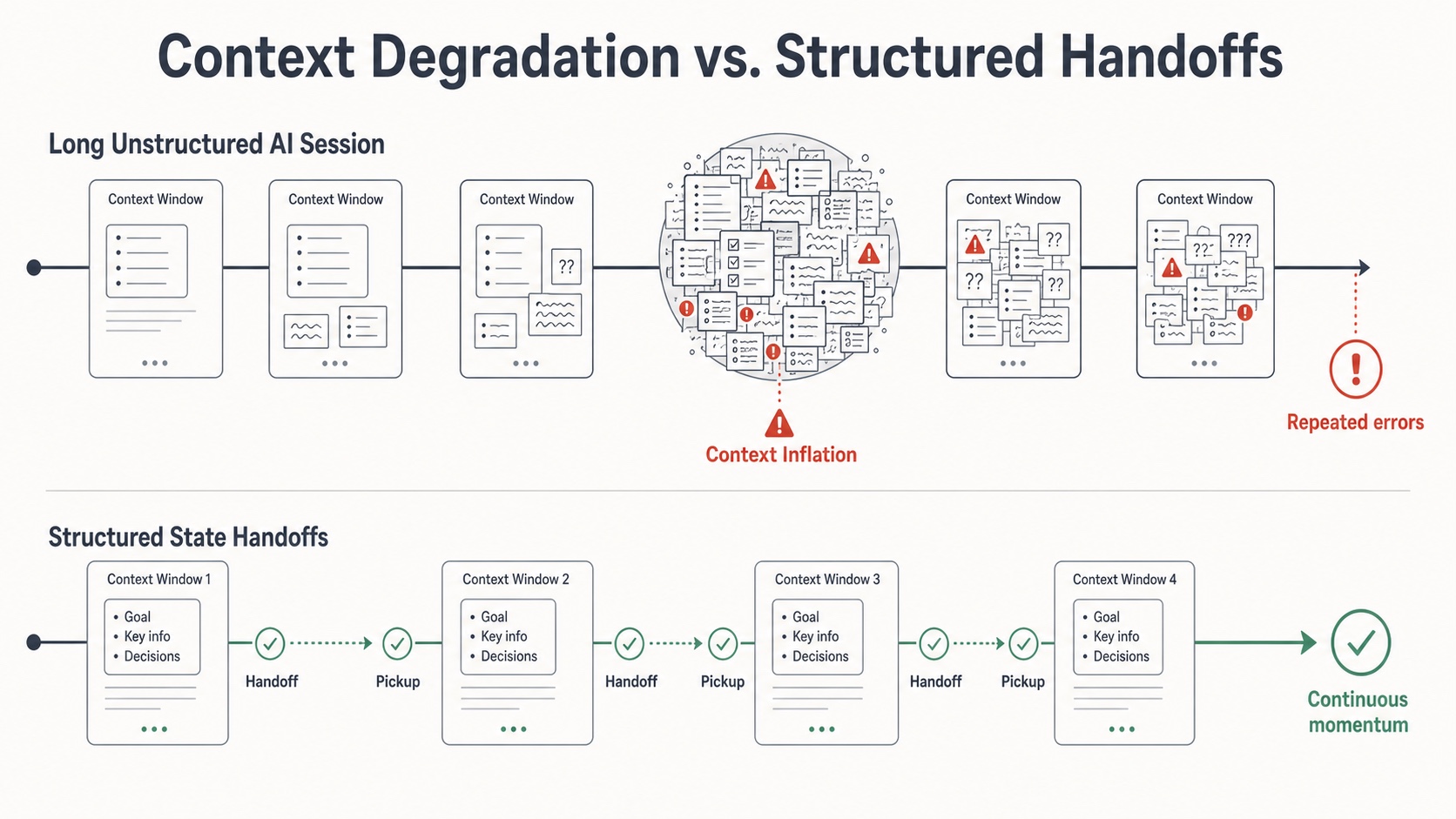
AI models operate inside a limited memory window called a context window. When a chat session gets crowded with dozens of messages, three common problems occur:
- The AI forgets previous decisions and suggests ideas you already rejected earlier in the day.
- The AI loses track of project details, accidentally overwriting finalized text or changing agreed guidelines.
- The AI makes unverified assumptions instead of checking your project files.
Relying on informal chat notes or copy-pasting old conversations is unreliable. Business teams need an automated Standard Operating Procedure (SOP) with clear Responsible, Accountable, Consulted, and Informed (RACI) ownership that lets the AI snapshot its work and hand over the baton cleanly to the next session.
Skill 1: Session Handoff (/handoff)
The Handoff skill acts as an automated shift-change note. Before you close a conversation or start a fresh window, /handoff tells your AI assistant to package everything it learned into an organized snapshot folder.
What Handoff Does for You
- The AI inspects your workspace and creates a timestamped snapshot folder at your project root:
handoff_YYYYMMDD_HHMMSS/. - The AI writes a clear summary document named
HANDOFF.mdcovering six structured sections:
- Executive Goal: your core business objective and project scope.
- Current Progress and Achievements: what has been completed so far and which files were updated.
- What Worked and Key Decisions: main strategy choices, tone decisions, and agreements made.
- What Didn't Work and Challenges: rejected ideas and dead ends, preventing future AI chats from repeating mistakes.
- Important Reminders: brand guidelines, confidentiality notes, and formatting rules.
- Next Steps: an actionable checklist ready for immediate execution.
- The AI backs up important log outputs or reference files into the snapshot folder.
- The AI displays a link to
HANDOFF.mdand reminds you to run/pickupwhen you start your next chat.
Repository link: GitHub - aruo-tomo/handoff
Skill 2: Session Pickup (/pickup)
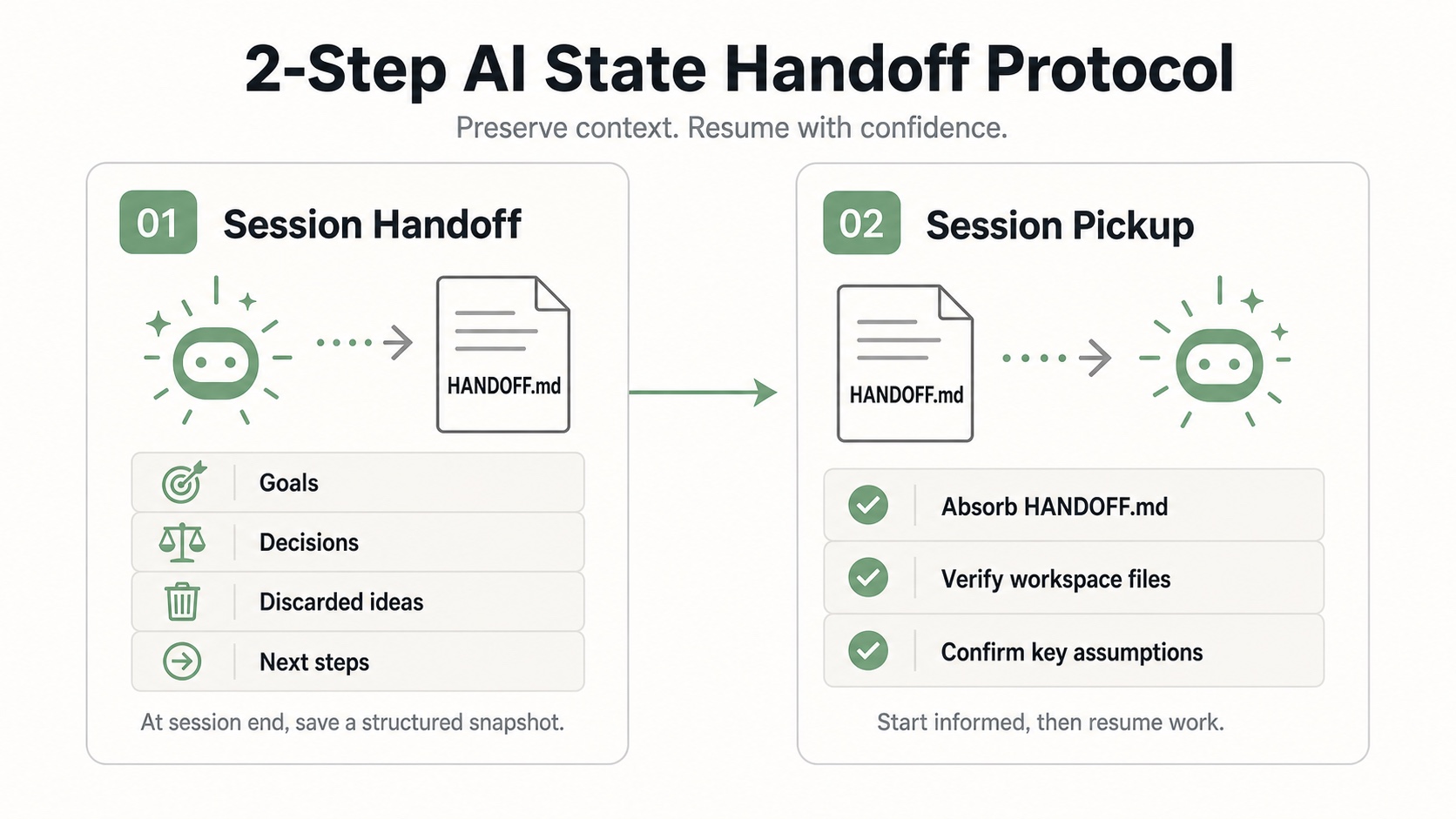
When you start a fresh chat session, running /pickup simulates an incoming colleague starting their shift. It restores project context in seconds while verifying that everything is accurate.
What Pickup Does for You
- The AI automatically finds the latest timestamped handoff snapshot in your project folder.
- The AI reads
HANDOFF.mdto absorb your goals, key decisions, and avoided mistakes. - Before taking action, the AI inspects your current workspace files to confirm that claimed progress matches real files.
- The AI lists its top three assumptions and asks clarifying questions if any detail is ambiguous.
- The AI pauses execution and waits for your explicit confirmation before starting work.
Repository link: GitHub - aruo-tomo/pickup
How to Install and Use These Skills
Non-engineers can easily set up these skills in supported AI platforms without technical complexity.
Simple Installation SOP
- Share the Repository Link: In compatible AI agent environments, tell your AI assistant to add the skill by providing the GitHub repository link:
- Handoff Skill:
https://github.com/aruo-tomo/handoff - Pickup Skill:
https://github.com/aruo-tomo/pickup
- Copy the Skill Text: Alternatively, open the
SKILL.mdfile from either repository and paste its text directly into your custom AI prompt settings or workspace rules.
How to Trigger the Skills
- When you finish a work session or notice the AI getting slow, type
/handoffor say "Perform a session handoff". - When you open a fresh chat window to continue your project, type
/pickupor say "Pick up where the previous agent left off".
Summary: Key Benefits for Business Teams
Treating AI like a human team member with /handoff and /pickup gives business leaders four immediate advantages:
- You can reset your AI context window anytime without losing progress or re-typing instructions.
- Documenting discarded ideas saves hours by stopping future AI chats from repeating failed approaches.
- Automatic workspace checks ensure the AI works from actual project files rather than guessing.
- Built-in confirmation pauses keep you in complete control of key decisions before work begins.